Stage Display
In Presenter, the Stage Display feature serves as a confidence monitor for your team on stage. You can display song lyrics, Scripture, and other text to the stage team so that they can follow along with what the audience sees. The Stage Display also allows them to preview upcoming slides, receive any important alerts from the off-stage team, and more.
Setting Up Stage Display
To enable Stage Display in Presenter click on the monitor-shaped icon in the top right corner of Presenter and click Screen settings.

From the Screens Settings window, select Stage Display from the Screen drop-down menu, then just below in Output assign a Display for stage display then click Save. You can also turn Stage Display off if you don't want to use this feature at all.
Stage Display Settings
With Screen settings open, locate Stage Display from the left menu. Here, you can assign default Templates to be used for each service element when displayed through the Stage Display. Click Select on any of the service item types and then choose one of the available templates. Click Save to apply the changes to your Stage Display.
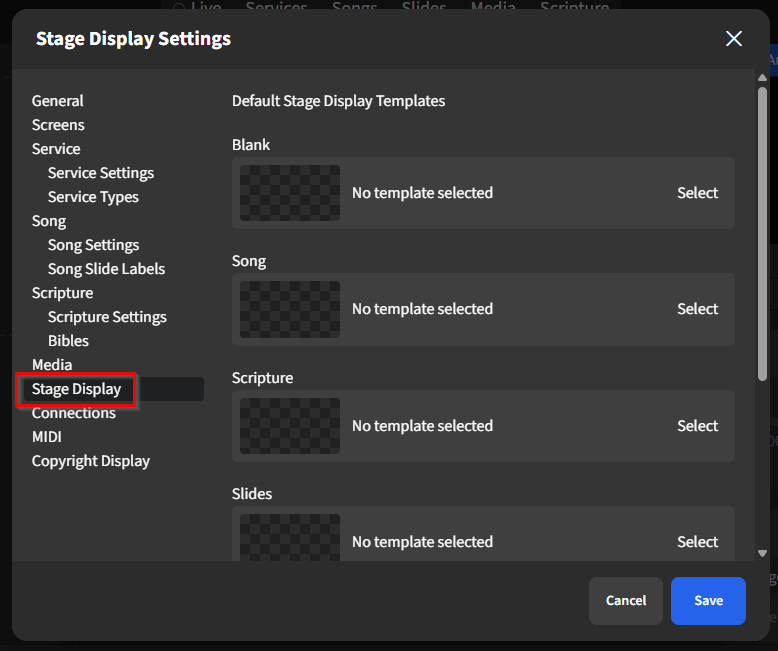 ,
,
Stage Display via Browser
To access Stage Display in a web browser, visit https://stage.worshiptools.com and log in to your account.